The Derivatives Account serves as the focal point for facilitating Derivatives trading tailored for Standard Account users. This specialized account streamlines trade management, providing traders with essential tools to enhance their trading endeavors. Similarly, the Inverse Derivatives Account mirrors the functionality of the Derivatives Account. However, it is exclusively accessible to Unified Trading Account users and is designed specifically for Inverse contracts.
While the Derivatives Account and Inverse Derivatives Account share similarities, they also exhibit distinct differences, including the following:
|
Derivatives Account
|
Inverse Derivatives Account
|
|
Applicable Users
|
Standard Account Users
|
Unified Trading Account Users
|
|
Supported Trading Products
|
- USDT Perpetual Contracts
- Inverse Perpetual and Futures Contracts
|
Inverse Perpetual and Futures Contracts
Note: To trade Derivatives other than Inverse Contracts, you will need to transfer funds to your Unified Trading Account.
|
|
Supported Currencies
|
USDT and assets that can be used to settle Inverse Contracts.
|
Non-USDT and non-USDC assets that can only be used to settle Inverse Contracts.
|
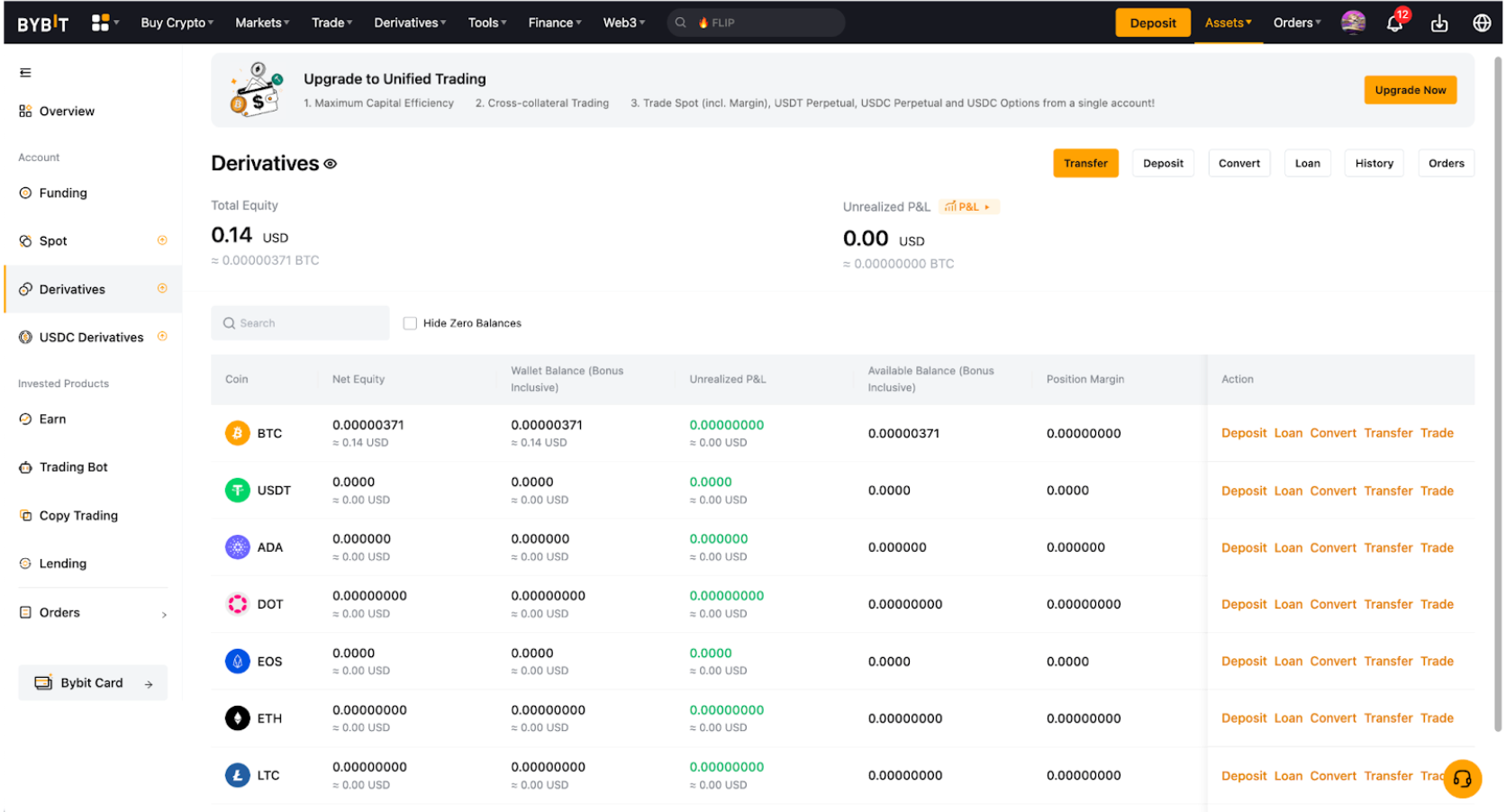
|
Total Equity
|
- Equity = Wallet Balance + Unrealized P&L (in Mark Price)
- The total equity value of your assets under the Derivatives Account, displayed in USD and BTC.
- The individual equity value of each asset is first converted to USD based on the index price and then converted back to its equivalent BTC value.
- If you have selected another fiat currency, please note that the displayed fiat amount is estimated and has been converted based on daily exchange rates on the Yahoo page.
|
|
Unrealized P&L
|
- This shows the unrealized P&L from Perpetual and Futures Contracts in the Derivatives Account.
- It is calculated by determining the difference between the average entry price and the current mark price
|
|
Coin
|
- This shows the current assets supported in your Derivatives or Inverse Derivatives Account.
|
|
Net Equity
|
- This is the equity value of the respective asset.
- Equity = Wallet Balance + Unrealized P&L (in Mark Price)
|
|
Wallet Balance (Bonus inclusive)
|
- The actual number of coins that you held physically in your Derivatives Account, including any bonus.
- Wallet Balance = Available Balance + Position Margin + Order Margin
- If you have a negative wallet balance, this can be due to your available balance and position margin being fully deducted by the Funding Fee, but your position is not liquidated yet as the current unrealized profit can maintain your position from liquidation.
|
|
Unrealized P&L
|
- Similar to the total unrealized P&L above, this includes the unrealized P&L in that respective coin by deriving the difference between the average entry price and the current mark price.
- However, your actual closed P&L is based on the difference between the average entry price and average exit price, minus any trading fees or funding fees.
- To learn how to calculate unrealized P&L, please refer to the articles below.
P&L Calculations (USDT Contract)
P&L Calculations (Inverse Contracts)
|
|
P&L
|
This shows the P&L analysis for your Derivatives Account, including your daily P&L details, Cumulative P&L and P&L Statistics. For more information, please refer to here.
|
|
Available Balance (Bonus Inclusive)
|
- This shows the available balance in your Derivatives Account for position opening and order placement.
- In Cross Margin mode, your position margin, along with your entire available balance in the respective settlement coin, is used to maintain your position. Consequently, when experiencing an unrealized loss, your position margin will occupy the available balance. For more details, please visit here.
|
|
Position Margin
|
- This shows the initial margin and fee to close the position occupied for your position.
- To learn how to calculate the position margin, please visit here.
|
|
Order Margin
|
- This shows the order margin occupied for your unfilled limit orders.
|
|
Bonus
|
- Bonus can be used as your position margin, offset trading and funding fees, or to cover your trading losses.
- Bonus cannot be withdrawn but profit earned from it can be withdrawn.
- For more information, please refer to our Rewards Terms and Conditions.
|
|
Transfer
|
This allows you to transfer the selected coin within your Main Account or across your Subaccounts. Read more on How to Transfer Assets on Bybit
|
|
Deposit
|
- You can make an on-chain transfer via Crypto Deposit from another exchange or wallet to your Bybit Account.
- For more information, please refer to How to Make a Deposit.
|
|
Loan
|
Clicking on this will redirect you to Bybit Crypto Loans Services. Please note that to use assets as collateral for Crypto Loans, you need to transfer them to a Spot Account (for Standard Account users) or a Funding Account (for Unified Trading Account users) before initiating the borrowing process. For more details, please refer to here.
|
|
Convert
|
You can convert your fiat or crypto into another currency easily without engaging in trades through Spot market. Read more on How to Convert Your Assets.
|
|
History
|
You can view the complete details of asset changes in your Derivatives or Inverse Derivatives Account by accessing the transaction history.
|
|
Orders
|
Clicking this will take you to the Order History for Derivatives or the Inverse Derivatives.
|
