
What is a USDT Perpetual Contract? How does it differ from an Inverse Perpetual Contract?
A USDT Perpetual Contract is a type of Futures Contract where USDT is used as the margin, and all profits and losses (P&L) are calculated and settled in USDT.
An Inverse Perpetual Contract, on the other hand, uses the underlying cryptocurrency (such as BTC or ETH) as margin. P&L is also calculated and settled in that cryptocurrency rather than in USDT.
Key differences:
How can I deposit USDT?
You can navigate to the Assets page and select Deposit, then choose Crypto Deposit → USDT.
Bybit Kazakhstan supports USDT deposits via multiple supported networks (e.g., ERC20, TRC20). Please refer to the deposit page for the full list of supported networks, and ensure that the selected network matches the one used by the sending platform.
Deposit arrival time depends on network confirmations and may vary by network.
You can also use the Convert feature to exchange other cryptocurrencies (such as BTC or ETH) into USDT for trading. Alternatively, you can purchase USDT via P2P Trading, bank card payments, or other supported fiat channels.
For more details, please refer to the deposit guide.
Can all users trade USDT Perpetual and Expiry Contracts?
To trade USDT Perpetual and Expiry Contracts, users must meet the following requirements:
- Complete at least Standard Identity Verification. Users from certain regions may be required to complete Advanced Identity Verification before accessing Derivatives trading.
- Not be located in any service-restricted countries or regions where Derivatives trading is unavailable.
What is the maximum leverage supported by USDT Futures Contracts?
The maximum leverage varies depending on the specific USDT contract. It is also determined by the risk limit tier.
In general, the larger the position value, the lower the maximum leverage available. This helps manage overall risk exposure.
For more details, please refer to Risk Limit (Perpetual and Expiry Contracts).
What is the risk limit?
Bybit Kazakhstan's risk limit uses a dynamic leverage model, where the maximum leverage decreases as position size increases. In other words, the larger the position value, the lower the maximum leverage available. At the same time, the initial margin requirement increases accordingly.
Each trading pair has its own basic maintenance margin ratio, and margin requirements adjust based on the selected risk limit tier.
For more details, please refer to Risk Limit (Perpetual and Expiry Contracts).
What margin modes are supported on Bybit Kazakhstan?
Bybit Kazakhstan's Unified Trading Account (UTA) supports three margin modes:
- Isolated Margin (IM)
- Cross Margin (CM)
- Portfolio Margin (PM)
By default, UTA is set to Cross Margin, but you can choose the margin mode that best suits your trading strategy.
Note: Please carefully assess the associated risks before switching margin modes, as this may affect margin requirements and liquidation risk.
For more information, please refer to Differences Between the Margin Modes Under the Unified Trading Account.
Why did my margin mode switch fail?
Margin mode switching may fail for the following reasons:
- You have open positions or active orders.
- Your long and short positions use different leverage (Hedge mode).
- Your available margin is insufficient.
- Your account does not meet the requirements for Portfolio Margin.
What position modes are supported for USDT Perpetual and Expiry trading?
USDT Perpetual and Expiry Contracts support the following position modes:
- One-Way mode: You can hold only one position per contract (either long or short). Opening an opposite position will reduce or close the existing position.
- Hedge mode: You can hold both long and short positions simultaneously.
What are the minimum and maximum order quantities for different trading pairs?
You can check the minimum and maximum order quantities for each trading pair on the Contract Details page.
If you wish to open a position larger than the maximum order quantity per order, you can do so by placing multiple orders.
What are the fees involved when trading Bybit Kazakhstan Perpetual and Expiry Contracts?
When trading Bybit Kazakhstan Perpetual and Expiry Contracts, the following fees may apply:
1. Trading fees
Trading fees apply to both Perpetual and Expiry Contracts. Taking non-VIP users as an example:
- Taker fee: 0.055%
- Maker fee: 0.02%
2. Funding fees (Perpetual Contracts only)
Perpetual Contracts are subject to funding fees, which are exchanged between long and short positions at scheduled funding intervals.
3. Settlement fees (Expiry Contracts only)
Expiry Contracts are subject to a 0.05% settlement fee when positions are automatically settled by the system on the settlement date.
For more details, please refer to Futures Contracts: Fees Explained.
Notes:
- If borrowing occurs during trading, interest will accrue on the outstanding amount based on the applicable hourly interest rate.
- If repayment is made using a different asset, asset conversion may be required, and a conversion fee may apply based on the applicable fee rates.
What order types are supported?
USDT Perpetual and Expiry Contracts support multiple order types, including:
- Market order – Executes immediately at the best available price
- Limit order – Executes at a specified price or better
- Conditional order – Triggered when a predefined trigger price is reached
- TP/SL order – Helps manage risk by setting a profit or loss target
- Trailing Stop – Automatically adjusts the stop price based on market movements
For more details, please refer to Types of Orders Available on Bybit Kazakhstan.
What order placement methods are supported?
You can place orders using the following methods:
- Order by Value – Specify the order value in USDT
- Order by Quantity – Specify the contract quantity (position size)
- Order by Cost – Specify the total cost, including margin and estimated fees to open and close the position (available in Hedge mode only)
This flexibility allows you to choose the method that best suits your trading preferences.
How is margin calculated?
The initial margin is calculated as:
- Position value ÷ Leverage
- Positions value = Quantity (size) × Mark price
As the position size increases, the required margin may also increase based on the selected risk limit tier.
The maintenance margin is the minimum margin required to keep a position open. If your margin falls below this level, your position may be subject to liquidation.
Do USDT Perpetual Contracts support hedging?
Yes. USDT Perpetual Contracts support Hedge mode, which allows you to hold both long and short positions simultaneously.
You can also apply different leverage levels to your long and short positions, providing greater flexibility in managing both short-term and long-term strategies.
Will a hedged position be subject to liquidation?
Under Isolated Margin mode, long and short positions are treated independently. Each position may be liquidated separately based on its own margin conditions.
Under Cross Margin mode, the system will first close fully hedged positions in Hedge mode at the mark price to release margin. If the account risk is not resolved, it will then continue liquidating partially hedged positions.
What are the differences between Auto-Margin Replenishment (AMR) and Cross Margin mode?
Auto-Margin Replenishment (AMR) is a feature available only under Isolated Margin mode. When AMR is triggered, the system automatically adds margin to a position using the available account balance to help reduce liquidation risk. You will also receive notifications, allowing you time to better manage your positions.
In contrast, Cross Margin mode uses all available eligible balances in the account as margin to support positions and calculate the liquidation price.
It is important to note that under Isolated Margin mode, long and short positions remain independent and may be liquidated separately based on their individual margin conditions.
Will a hedged position be subject to auto-deleveraging (ADL)?
The same general logic as liquidation applies to ADL.
- Under Isolated Margin mode, each position may be subject to ADL individually.
- Under Cross Margin mode, fully hedged positions will not be selected for ADL. If positions are not fully hedged, only the unhedged portion may be subject to ADL, while the hedged portion remains unaffected.
For more details, please refer to the Auto-Deleveraging (ADL) Mechanism.
What is the order cost?
The order cost refers to the total margin required to open a position.
Formula: Order cost = Initial margin + Opening fee + Closing fee
Since the closing price is unknown when opening a position, the closing fee is estimated using the bankruptcy price and the non-VIP taker fee rate.
For more details, please refer to Order Cost (Perpetual and Expiry Contracts).
Why is the order cost different for long and short orders?
Order cost may differ between long and short positions because the estimated closing fee is based on the bankruptcy price, which varies by position direction.
As the bankruptcy price depends on factors such as position direction, leverage, and margin, the estimated closing fee — and therefore the total order cost — may also differ.
Why can't I place an order even though I have a balance?
This usually occurs when your available balance is insufficient to place an order. Your available balance may be reduced by margin used for open positions, active orders, or unrealized losses.
Please ensure that you have sufficient available balance before placing a new order.
What is the difference between wallet balance and available balance?
- Wallet balance shows the total assets held in your account.
- Available balance shows the amount you can use to place new orders.
The available balance may be lower than the wallet balance because some funds may already be allocated to open positions or place orders.
Why did my order fail?
Your order may fail for any of the following reasons:
- You do not have sufficient available balance to open the position.
- Your order size exceeds the risk limit.
- Your order price is outside the allowed trading range.
- Your order quantity is below the minimum order size.
- Your account is subject to trading restrictions (e.g., cooling-off period or risk control measures).
Why was my limit order filled at a different price than my limit price?
This usually happens when your limit order is immediately matched with better prices available in the order book. When your order is executed, it is always filled at the best available price.
Example:
Buy order
- Best ask price: $67,042
- Your limit price: $67,080
- Execution price: $67,042 (better than your limit price)
Sell order
- Best bid price: $66,943
- Your limit price: $66,930
- Execution price: $66,943 (better than your limit price)
Why does my position value fluctuate?
Position value is calculated based on the mark price, which changes with market conditions.
Formula: Position value = Mark price × Position size
Since the mark price updates continuously, your position value will also fluctuate.
Can I manually add margin to my position?
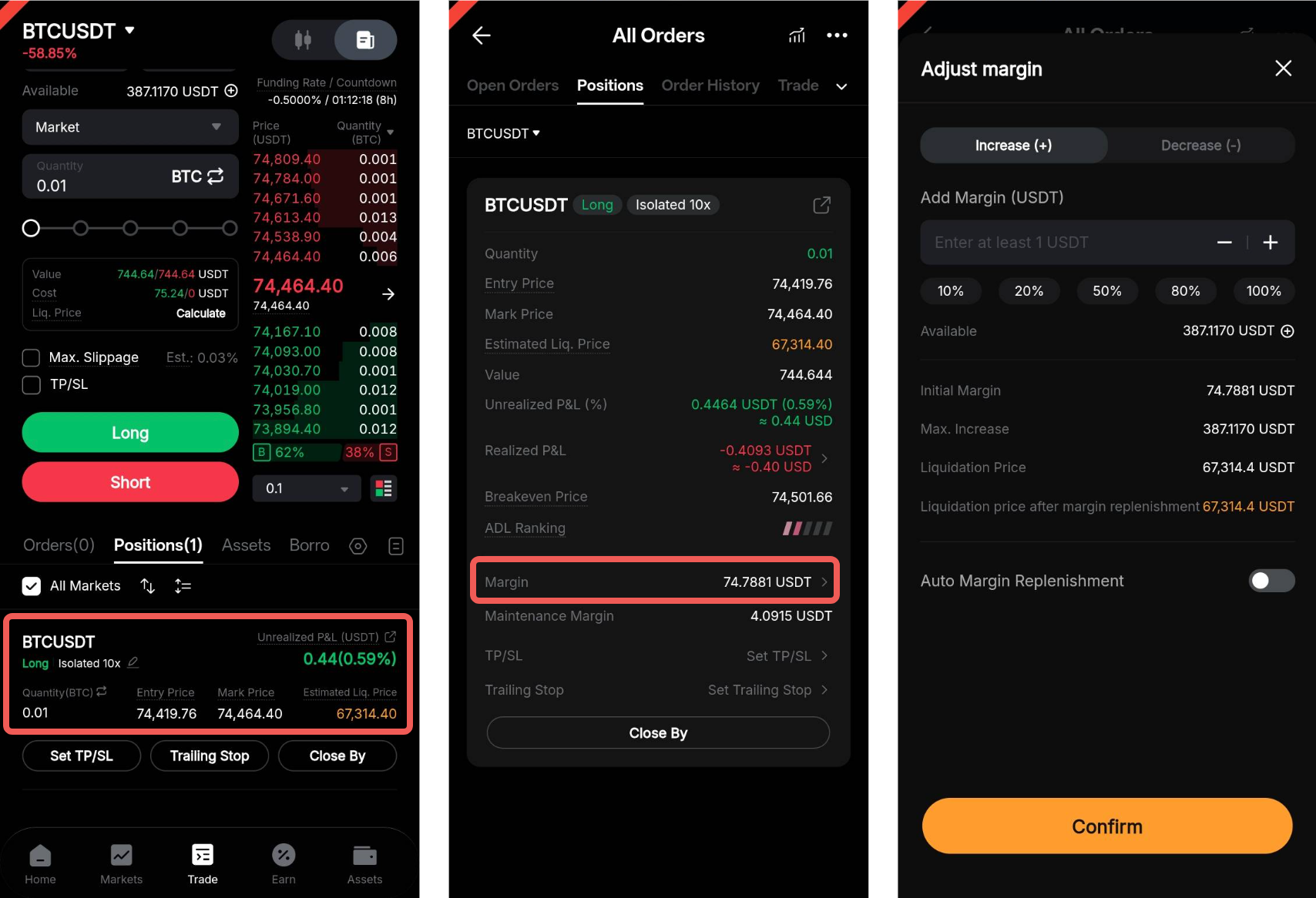
Yes, you can manually add margin to your position when using Isolated Margin mode to help reduce liquidation risk.
On the website, go to the Positions tab at the bottom of the trading page, then click the edit icon next to IM.

On the Bybit Kazakhstan App, go to the Positions tab at the bottom of the trading page and tap the relevant position. Once you’re on the positions details page, tap Margin to open the margin adjustment window.
Why does ROI appear different in Hedge mode?
In Hedge mode, ROI is calculated based on the margin allocated to each individual position. Since long and short positions use separate margins, ROI may differ from what you see in One-Way mode.
Example:
- Long position: Margin = 100 USDT, Profit = 10 USDT → ROI = 10%
- Short position: Margin = 50 USDT, Profit = 10 USDT → ROI = 20%
Why does ROI change when I add margin?
ROI is calculated based on the position margin. When you add margin, the total margin increases, which may lower your ROI even if your P&L remains unchanged.
Example:
Profit = 10 USDT, Margin = 100 USDT → ROI = 10%
After adding 100 USDT to the margin:
Profit = 10 USDT, Margin = 200 USDT → ROI = 5%
ROI decreases because the margin used in the calculation has increased.
Why is my P&L different after closing a position?
Your final P&L may differ due to factors such as trading fees, funding fees, slippage, or differences between the mark price and your execution price.
- Unrealized P&L does not include trading or funding fees and fluctuates as the market price moves.
- Realized P&L is calculated after your position is closed, taking into account all applicable fees.
What are unrealized P&L and realized P&L?
- Unrealized P&L refers to the profit or loss of your open positions based on the current mark price. It changes as the market price moves.
- Realized P&L refers to the actual profit or loss after a position is closed, including trading and funding fees.
For more details, see P&L Calculations (USDT Perpetual and Expiry Contracts).
Can I use unrealized profit to open a new position or withdraw it?
This depends on the margin mode:
- Isolated Margin mode: No. Unrealized profit is tied to a specific position and cannot be used to open new positions or be withdrawn before the position is closed.
- Cross Margin and Portfolio Margin modes: Yes. Unrealized profit can increase your available balance and may be used to open new positions, subject to the account's overall margin requirements. However, it cannot be withdrawn unless the position is closed and the profit is realized.
Where can I find my P&L?
You can check your P&L in the Positions tab and P&L history:
- The Positions tab displays both:
- Unrealized P&L — profit or loss of open positions based on the mark price
- Realized P&L — P&L from partially closed positions and fees paid/received
- The P&L history shows the final realized P&L of closed positions/orders, including entry and exit price, quantity, trading fees, and funding fees.
Where can I find my trading history?
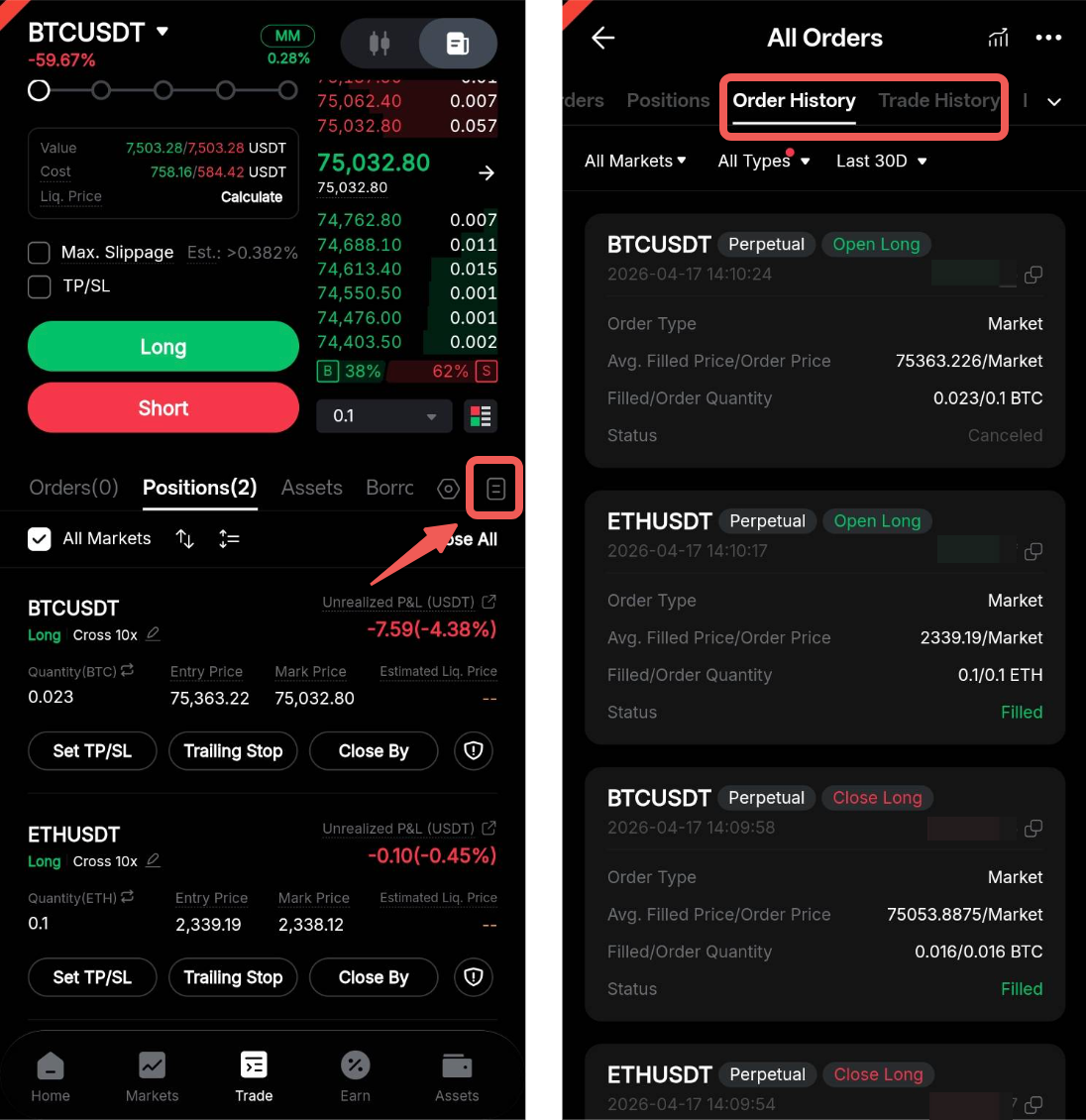
On the website, you can view your trading history in the Order History and Trade History sections below the trading chart. Click All Orders to view the complete records.

On the Bybit Kazakhstan App, tap the history icon below the order book to access your Order History and Trade History.
How does liquidation work under different margin modes?
Liquidation occurs when your margin falls below the required maintenance margin. The calculation and trigger conditions vary depending on the margin mode:
Isolated Margin (IM): Liquidation is based on the margin allocated to a specific position. Only the margin assigned to that position is at risk, and liquidation of one position will not affect other positions.
Cross Margin (CM): Margin is shared across all positions in your Unified Trading Account (UTA). Liquidation is triggered when the account's maintenance margin ratio (MMR) reaches 100%.
Portfolio Margin (PM): A risk-based stress testing model is used to assess overall portfolio risk, taking into account factors such as the mark price and implied volatility of the underlying asset. Liquidation occurs when the MMR reaches 100%.
For more details, please refer to the following articles:
What is the liquidation price?
The liquidation price is the price at which your position will be automatically closed to prevent further losses when your margin falls below the required maintenance margin.
Note: Liquidation is triggered based on the mark price, not the last traded price.
What is the bankruptcy price?
The bankruptcy price is the price at which your position margin is fully depleted, meaning your position can no longer absorb any additional losses.
To prevent losses from exceeding your margin, liquidation typically occurs before the bankruptcy price is reached.
How is the liquidation price calculated?
The liquidation price depends on several factors, including your entry price, leverage, position size, margin used, and available balance. Liquidation is generally triggered when your maintenance margin ratio reaches 100%.
For more information on liquidation, please refer to this article.
How can I avoid liquidation?
You can reduce your risk of liquidation by:
- Lowering your leverage
- Adding more margin
- Reducing your position size
- Partially closing your position
- Monitoring your maintenance margin ratio (MMR)
- Setting Take Profit/Stop Loss (TP/SL) levels
Please note that liquidation risk increases during periods of high market volatility and cannot be completely avoided. It is important to monitor your positions closely and make timely adjustments.
How can I understand my position and account risk?
You can monitor your risk level using the following indicators in the Positions tab:
- Maintenance margin ratio (MMR)
- Liquidation price
- Available balance
- Position margin
Regularly reviewing these indicators can help you better manage your position risk. For more information on indicators and trading terms, please refer to this article.