Take Profit (TP) and Stop Loss (SL) are tools for managing trading risk. With TP/SL, you can automatically close trades or positions when the market reaches your predetermined price levels. A TP order allows you to secure profits, especially in volatile markets, while an SL order helps limit potential losses when the market moves in an unfavorable direction.
The following sections explain how TP/SL works for both Spot and Futures trading.
Differences Between Spot TP/SL and Futures TP/SL
TP/SL works differently for Spot and Futures trading. The table below outlines the key differences:
Spot TP/SL
Similar to OCO and conditional orders, Spot TP/SL allows traders to automatically place buy or sell orders at preset price levels. However, these order types differ in how assets are reserved, as outlined below:
Direct TP/SL via the Order Zone
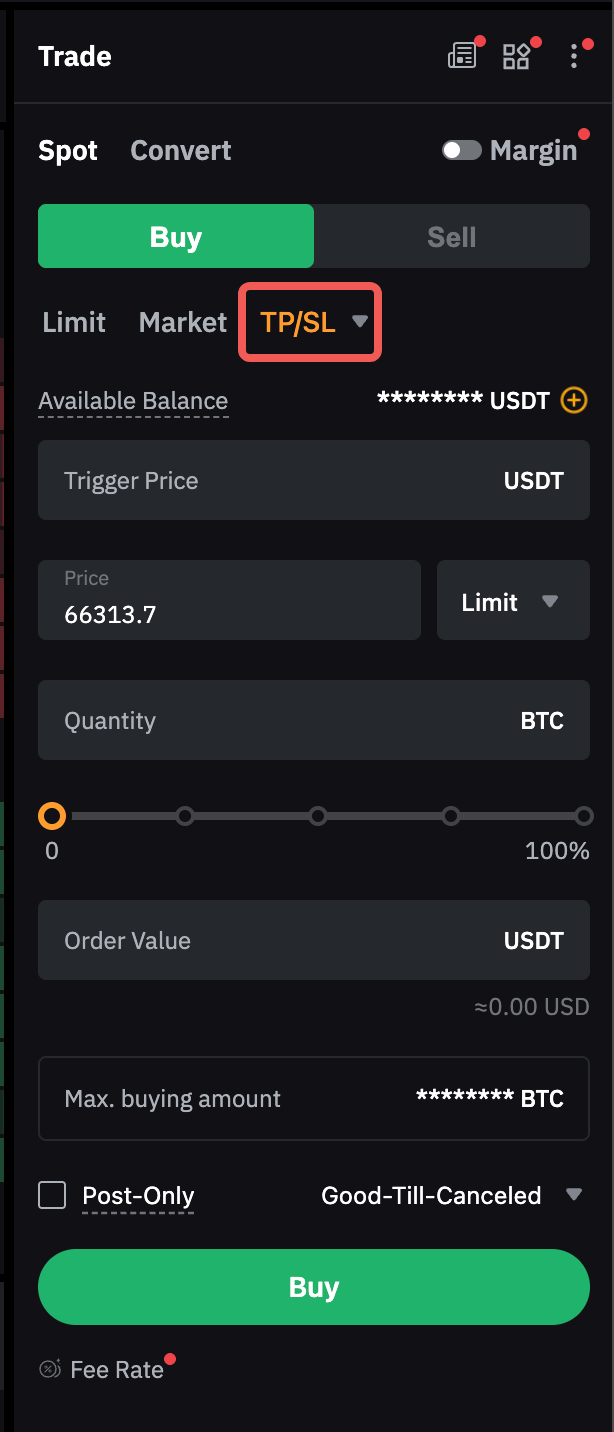
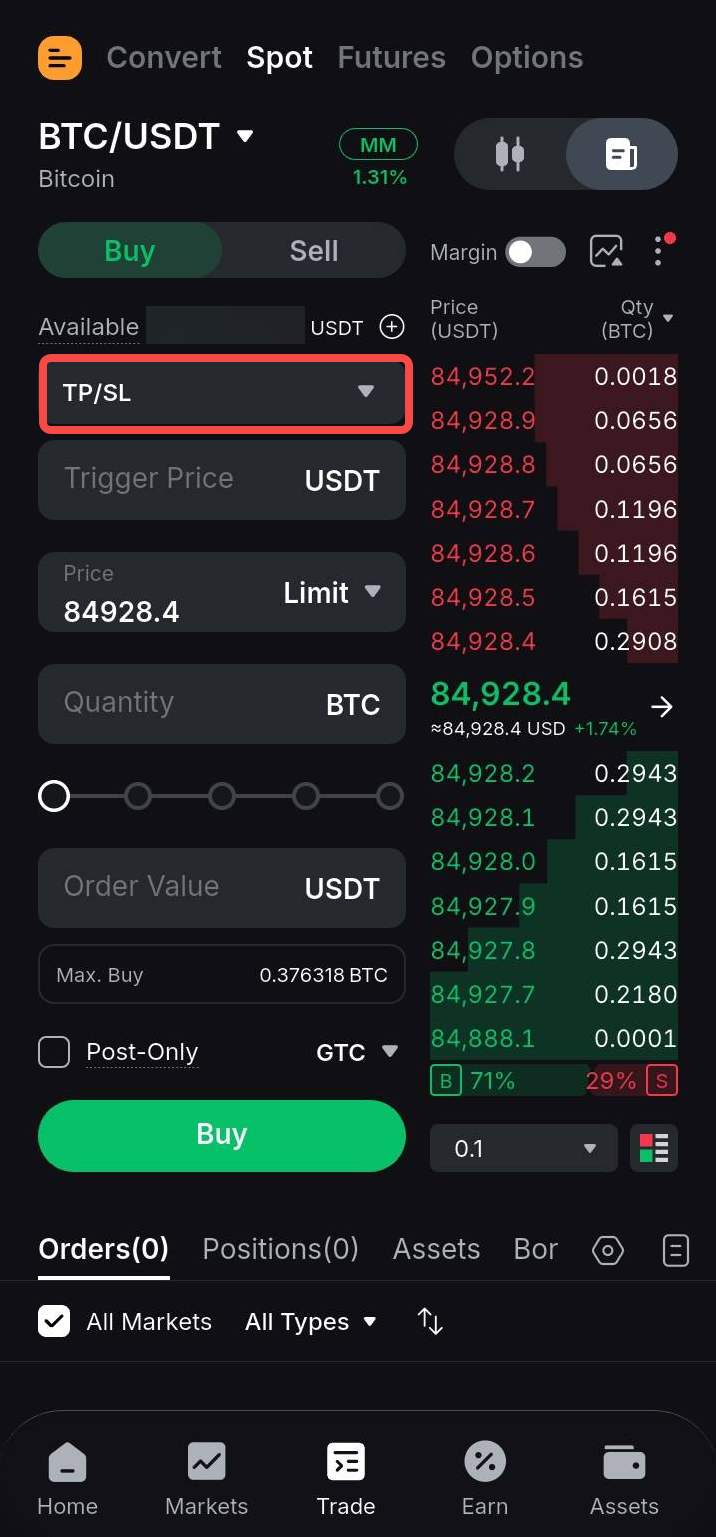
You can set the trigger price, order price (for limit orders), and order quantity for a TP/SL order. Assets are reserved when the TP/SL order is placed. Once the Last Traded Price reaches the preset trigger price, a limit or market order will be placed based on your order settings. For more information on how to set up TP/SL via the order zone, refer to this section.
Important Notes:
a. A market order will be executed immediately at the best available market price. All market orders follow the IOC (Immediate-or-Cancel) principle. Any portion that cannot be filled immediately due to insufficient market liquidity or price limits will be automatically canceled.
b. A limit order will be submitted to the order book for execution at the specified order price. If the best bid/ask price is better than the order price, the limit order may be executed immediately at the best available price. Limit order execution is not guaranteed and depends on price movements and order book liquidity.
Example
Assuming the current BTC price is 20,000 USDT, the following examples illustrate how TP/SL orders work with different trigger and order prices.
Preset TP/SL With a Limit Order
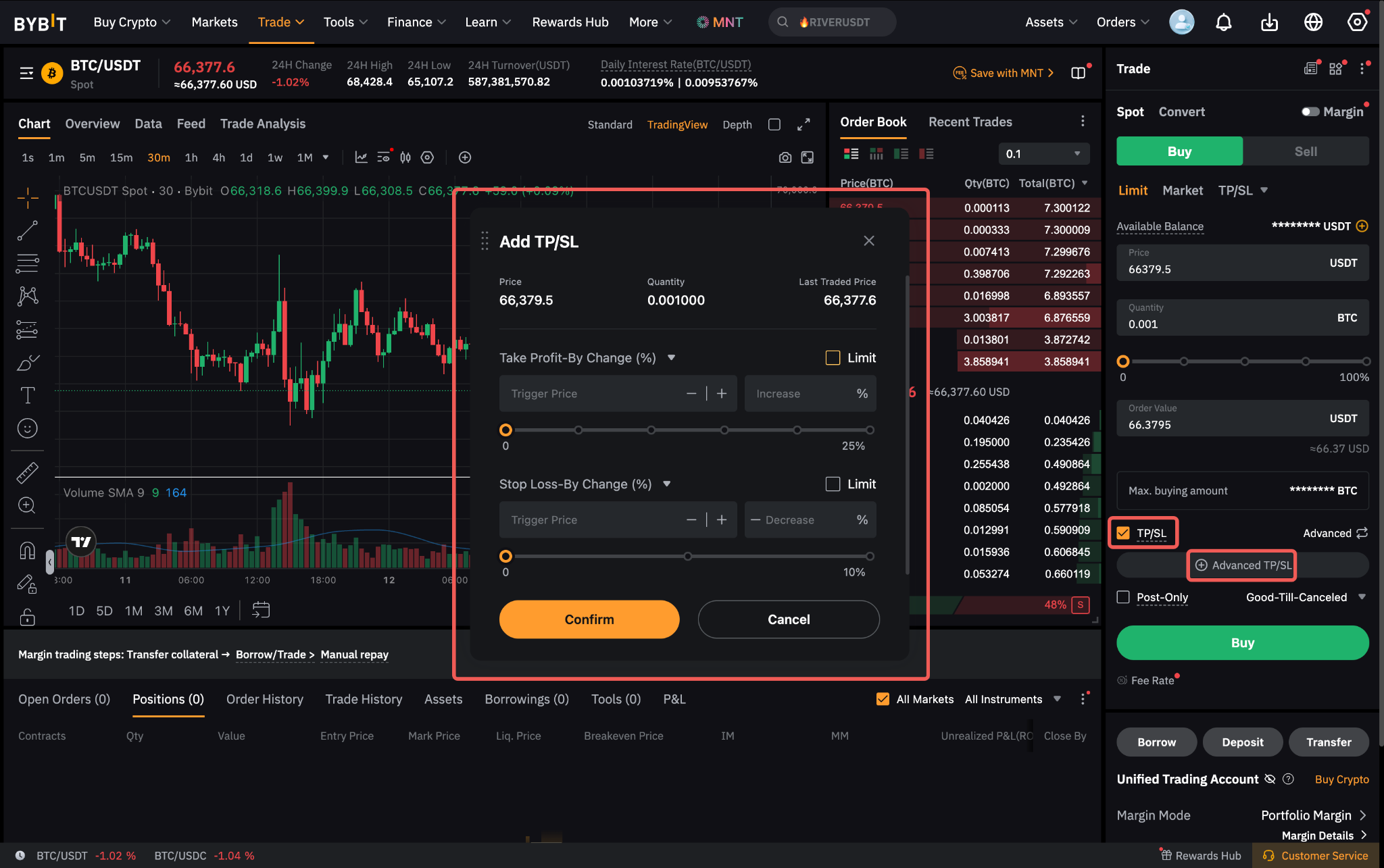
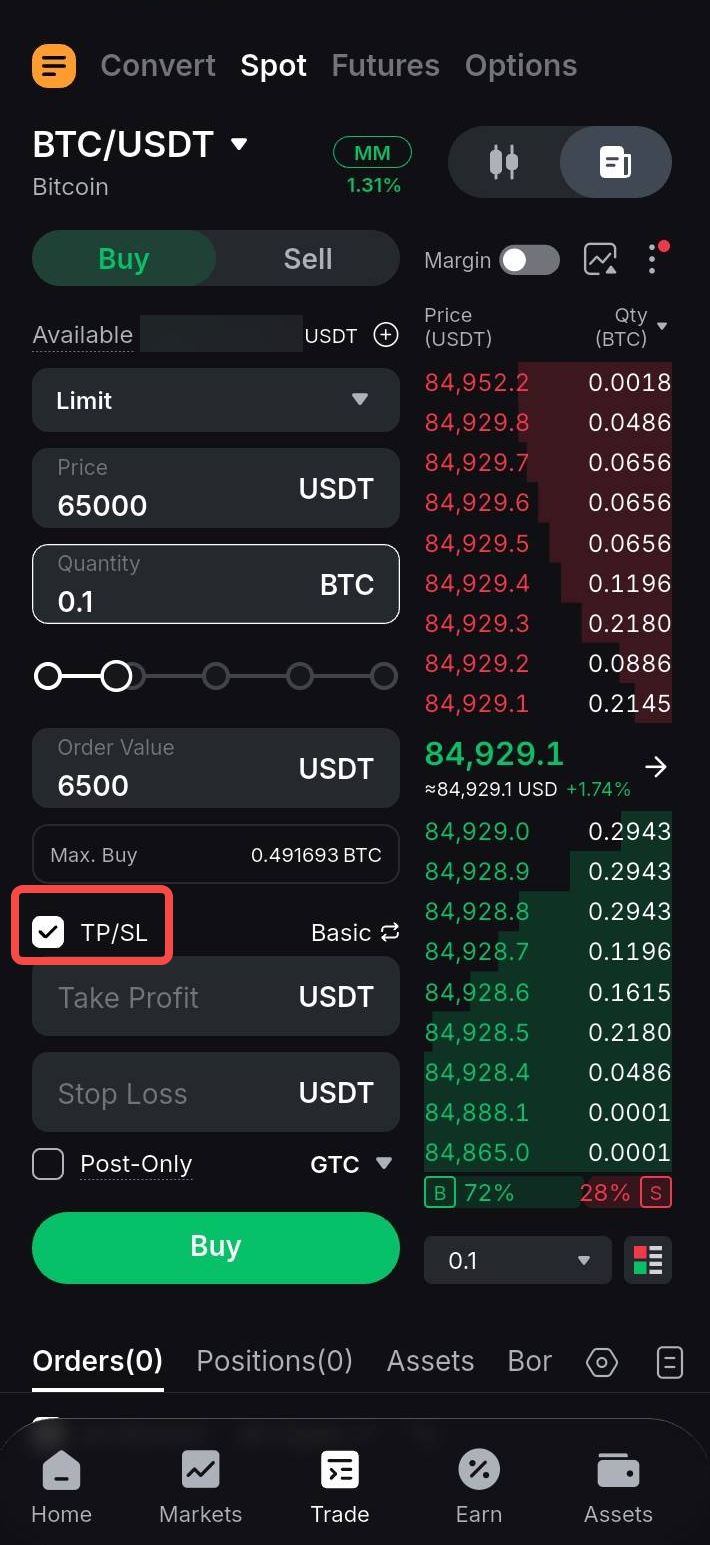
When placing a limit order, you can also preset TP/SL orders. Once the limit order is executed, the preset TP/SL orders are automatically placed based on the specified trigger prices and order quantity.
Unlike standalone TP/SL orders, which reserve assets immediately upon placement, TP/SL preset with a limit order follows the One-Cancels-the-Others (OCO) principle. Assets are reserved only for one side at a time. This allows you to preset both TP and SL as market or limit orders for the same asset. When one order is triggered, the other is automatically canceled.
For limit TP/SL orders, once either the TP or SL is triggered, the other order is canceled immediately, even if the triggered order has not been filled. This may increase risk during sudden price reversals, as the triggered limit order may remain unfilled while the other order has already been canceled.
For more information on how to set up TP/SL via the order zone, refer to this section.
Example
Trader A places a BTC limit buy order at 40,000 USDT and presets TP/SL as follows:
- Limit order price: 40,000 USDT
- Order quantity: 1 BTC
- TP limit: Trigger price at 50,000 USDT, and order price at 50,500 USDT
- SL market: Trigger price at 30,000 USDT
Assuming the BTC price reaches 40,000 USDT and the limit order is filled, the preset TP/SL orders are placed.
Scenario 1: The BTC price rises to 50,000 USDT. The TP is triggered, and a limit sell order at 50,500 USDT is placed in the order book for execution. The SL order is automatically canceled.
Scenario 2: The BTC price falls to 30,000 USDT. The SL is triggered, and a market sell order is placed. The 1 BTC is sold at the best available market price.
Important Notes:
a. For a TP/SL sell order attached to a Spot limit buy order, the TP trigger price must be higher than the limit order price, while the SL trigger price must be lower.
b. For a TP/SL buy order attached to a Spot limit sell order, the TP trigger price must be lower than the limit order price, while the SL trigger price must be higher.
c. For limit TP/SL orders, the order price must be within the price limit applicable to the trigger price. For example, if the price limit for BTC/USDT is 3%, the TP/SL buy order price cannot exceed 103% of the trigger price, while the TP/SL sell order price cannot be lower than 97% of the trigger price. Refer to the Spot Trading Rules for the price limits of each symbol.
d. If the order amount or value does not meet the minimum order requirement after the limit order is filled, the TP/SL order may not be placed or executed when triggered.
e. Spot limit and market orders have different maximum order sizes. If you attempt to preset a TP/SL market order when placing a limit order whose quantity exceeds the maximum market order size, the limit order will be rejected. For example, if the maximum limit order size is 1 BTC and the maximum market order size is 0.5 BTC, a 1 BTC limit order with a preset TP/SL market order will be rejected.
Futures TP/SL
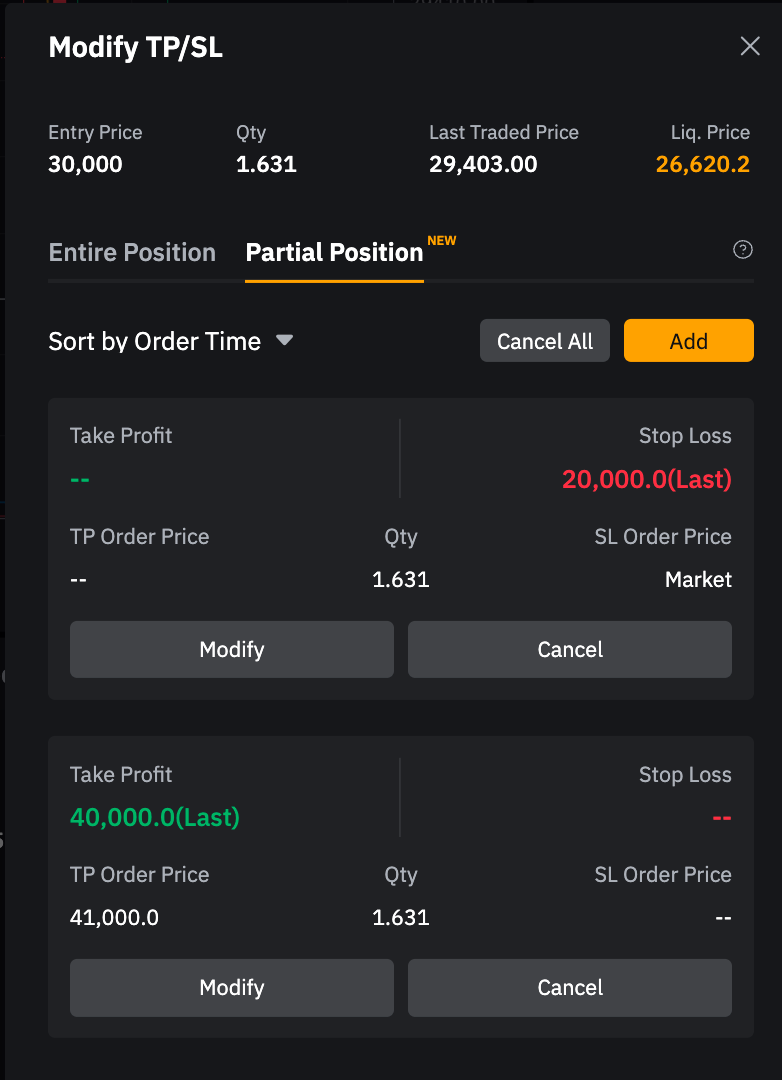
In Futures trading, TP/SL orders are used to partially or fully close an active position. You can preset TP/SL when placing a limit, market, or conditional order via the order zone, and modify the preset TP/SL before the order is filled.
Bybit Kazakhstan offers the following TP/SL preferences for closing a Futures position:
Important Notes:
a. Futures TP/SL orders do not require additional margin. However, if the available margin becomes insufficient to maintain the position, such as due to sustained losses or margin adjustments, pending TP/SL orders will be canceled if the entire position is liquidated.
b. A TP/SL order may be partially filled or remain unfilled due to:
- Insufficient order book liquidity, especially for large positions.
- Extreme market volatility, where rapid price movements may reduce order book depth at the trigger price and result in slippage.
- The position being fully closed manually or by another TP/SL order before the preset TP/SL is triggered. Once the position is fully closed, any pending TP/SL orders are automatically canceled.
c. If you use Futures TP/SL to close a position that exceeds the maximum order size for the symbol, the system will automatically split the closing order into multiple smaller orders. Each resulting order will not exceed the maximum order size.
Example: Assume the maximum market order size for BTCUSDT is 150 BTC. If you place a market TP order to close a 300 BTC position, the system will split it into two market orders of 150 BTC each upon execution.
Maximum market and limit order sizes vary by symbol. For more information, refer to the Trading Parameters page.
d. For partial TP/SL, the closing quantity cannot be adjusted below the minimum position size. In this case, you may only be able to close the entire position.
e. You can place a TP/SL order for the entire position alongside multiple partial TP/SL orders. If the entire-position TP/SL order is filled first, the partial TP/SL orders will be automatically canceled.
f. If you have multiple partial TP/SL orders with different closing quantities, the position size will be reduced based on which TP/SL order is executed first. If the closing quantity of a remaining TP/SL order exceeds the current position size, the excess quantity will be canceled and the remaining position may be fully closed upon execution. For more information, refer to Scenario 1 below.
Example
The following scenarios illustrate how Futures TP/SL works.
Scenario 1: Multiple TP/SL orders
Assume the current BTC market price is $25,000. Trader A holds a 1 BTC long position with the following TP/SL orders:
TP/SL order A
- TP/SL preference: Partial position (via conditional market order)
- TP trigger price: $26,000
- Qty: 0.5 BTC
TP/SL order B
- TP/SL preference: Partial position (via conditional limit order)
- TP trigger price: $30,000
- Order price: $30,500
- Qty: 0.5 BTC
TP/SL order C
- TP/SL preference: Entire position
- SL trigger price: $23,000
- Qty: 1 BTC
The orders behave as follows under different market conditions:
a. When the BTC market price reaches $26,000, TP/SL order A is triggered and closes 0.5 BTC at the market price. Trader A has a remaining position of 0.5 BTC. TP/SL orders B and C remain active.
b. When the BTC market price reaches $27,000, Trader A manually closes 0.1 BTC, leaving a 0.4 BTC position. TP/SL Orders B and C remain active.
c. When the BTC market price reaches $30,000, TP/SL order B is triggered, and a TP limit order at $30,500 is placed in the order book for execution.
- If the price reaches $30,500, the TP limit order is filled and the remaining 0.4 BTC position is closed. TP/SL order C is then automatically canceled.
- If the price does not reach $30,500 and falls back to $23,000, TP/SL order C is triggered and the remaining 0.4 BTC position is closed at the market price. TP/SL order B and the excess 0.1 BTC of order C are then canceled.
Scenario 2: An existing TP/SL order and a new order with TP/SL
Assume the current BTC market price is $25,000. Trader A holds a 1 BTC long position with the following TP order:
TP/SL order A
- TP/SL preference: Partial position (via conditional market order)
- TP trigger price: $26,000
- Qty: 0.5 BTC
Trader A then places an additional 1 BTC limit order to increase the long position at $24,000, with TP/SL preset for the current order as follows:
- TP trigger price: $27,000
- SL trigger price: $22,000
- Qty: 1 BTC
The orders behave as follows under different market conditions:
a. The BTC market price drops to $24,000. Due to market volatility, only 0.5 BTC of the limit order is filled, increasing the position size to 1.5 BTC. A new TP/SL order is placed for the filled quantity:
TP/SL order B
- TP/SL preference: Partial position
- TP trigger price: $27,000
- TP Qty: 0.5 BTC
- SL trigger price: $22,000
- SL Qty: 0.5 BTC
b. When the BTC market price rises to $26,000, TP/SL order A is triggered and closes 0.5 BTC at the market price, leaving a 1 BTC position. TP/SL order B remains active.
c. When the BTC market price drops back to $24,000, the remaining 0.5 BTC of the limit order is filled, increasing the position size to 1.5 BTC. Another TP/SL order is placed for the newly filled 0.5 BTC:
TP/SL order C
- TP/SL preference: Partial position
- TP trigger price: $27,000
- TP Qty: 0.5 BTC
- SL trigger price: $22,000
- SL Qty: 0.5 BTC
Trader A now holds a 1.5 BTC long position with two separate TP/SL orders, orders B and C.
Scenario 3: An existing TP/SL order and a new order with SL for the entire position
Assume the current BTC market price is $30,000. Trader A holds a 1 BTC long position with the following TP/SL order:
- TP/SL preference: Entire position
- TP trigger price: $35,000
- SL trigger price: $20,000
- Qty: 1 BTC
Trader A then places an additional 0.5 BTC limit order to increase the long position at $28,000 with the following SL preset:
- TP/SL preference: Entire position
- SL trigger price: $18,000
- Qty: 0.5 BTC
When the BTC market price reaches $28,000, the limit order is fully filled, increasing the position size to 1.5 BTC. The new SL order replaces the existing TP/SL order, and the existing TP and SL are canceled. The new SL order is updated as follows:
- TP/SL preference: Entire position
- SL trigger price: $18,000
- Qty: 1.5 BTC
Scenario 4: An order with TP/SL preset for the current order at placement
Trader A places a 0.8 BTC limit order to open a long position at $30,000 with TP/SL preset for the current order as follows:
TP/SL order A
- TP/SL preference: Current order
- Quantity: 0.8 BTC
- TP (limit): Trigger price = $40,000; Order price = $41,000
- SL (market): Trigger price = $20,000
Assume the BTC price reaches $30,000 and the limit order is filled. The TP (limit) and SL (market) orders are then placed.
a. When the BTC price reaches $40,000, the TP is triggered and a limit close order at $41,000 is placed in the order book for execution. The corresponding SL (market) order with a trigger price of $20,000 is canceled immediately, even if the TP limit order has not yet been filled.
This is because the system treats the TP and SL as a single set. Once the TP trigger price is reached, the trigger condition is considered fulfilled and the corresponding SL order is canceled.
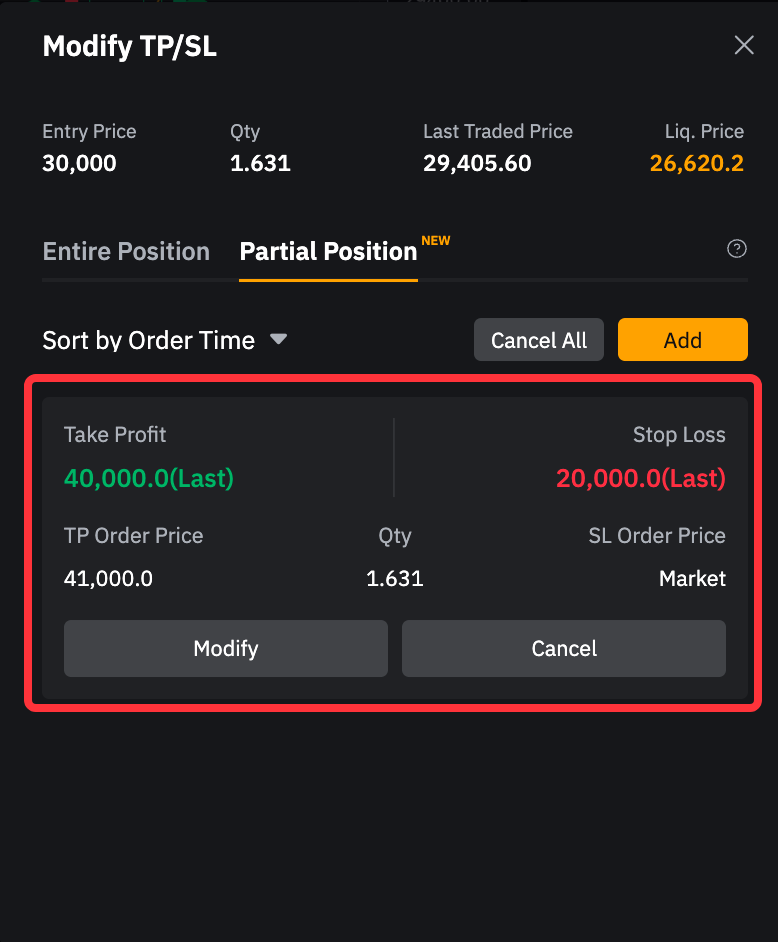
b. To prevent the SL order from being canceled when an unfilled TP limit order is triggered, Trader A can either:
- Set the TP and SL orders separately, or
- Use Close by Limit Order under the Positions tab to set a TP order.